
Google Business Profile Suspended in 2026? How to Get It Back
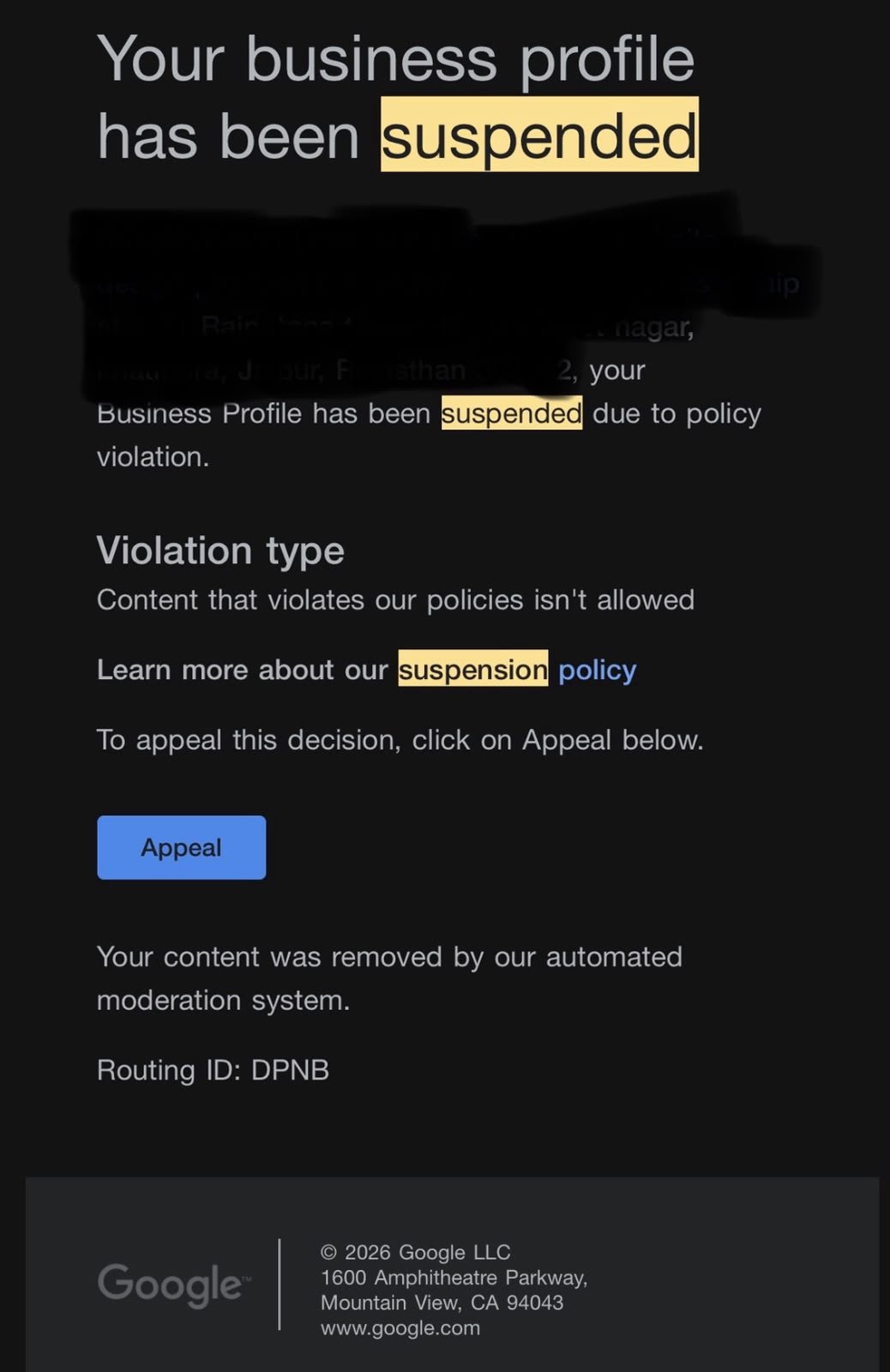
If your Google Business Profile is suspended, don't delete it or create a new one. Fix the problem first, then appeal once in Google's appeals tool with proof like your GST certificate or an electricity bill. Simple appeals often get a decision in about 5 days.
Google Business Profile suspended? You can't reply to reviews or post, and sometimes your listing disappears from Maps. Most suspensions can be reversed if you fix the problem first and send the right proof. We've reinstated several suspended profiles for our clients, and this is the process we follow.
What does "suspended" mean?
| What you see | What it means |
|---|---|
| "Suspended" in your dashboard, listing still on Maps | Soft suspension: you can't manage the profile |
| Listing gone from Search and Maps | Hard suspension: the profile is removed |
| All your profiles suspended together | A restricted owner or manager account caused it. Remove that account first, then appeal from one that isn't restricted. |
Why do profiles get suspended?
Usually because of a break of Google's guidelines:
- Keywords or a city in the name, like "Sharma Dental Clinic Best Dentist Jaipur"
- Address problems: a virtual office, or showing an address when you only visit customers
- Too many categories added as keywords
- Duplicate profiles for the same location
- Many big edits at once: name, address and category on the same day
- Fake or paid reviews
Sometimes nothing is wrong at all and Google's system flags a genuine business by mistake. That's exactly what happened in the case below.
What should you do first?
- Don't delete the profile or create a new one. Google warns against this, and a new profile counts as a duplicate.
- Stop editing until the appeal is done.
- Read Google's email. It usually names the rule you broke.
Is a restricted manager account the reason?
Often, yes. If any owner or manager on your profile has a restricted Google account, Google can suspend every profile that account is connected to. You'll usually get an email saying your profile was connected to a restricted account.
Here's what to do, in this order:
- Find the restricted account. Check Google's email, then open your profile's People and access settings and look for the owner or manager it names.
- Remove that owner or manager from the profile. Do this from an owner account that is not restricted. If the restricted account is the primary owner, first make another owner the primary owner.
- Appeal from the account that is not restricted. Never appeal from the restricted one.
- Don't use the restricted account again. Don't log in to the profile with it or send it access again. Any new link to it can bring the suspension back.
This is the first thing we check on every suspended profile, because it's the most common reason we see.
How do you appeal a suspended profile?
These are the steps from Google's help page:
- Fix the problem first. Google checks the profile as it is when you appeal.
- Keep your proof ready: GST certificate, a recent electricity bill, signboard photos and a short video of the business. The name and address must match the profile exactly.
- Open the appeals tool, select the profile and submit.
- Upload proof within 60 minutes of opening the evidence form, or it won't be attached.
- Wait for the email. Don't send the same appeal again.
- If it's denied, Google may allow one more review with extra proof.
How long does it take?
Google gives no fixed time. Simple appeals often get an answer in about 5 days (Whitespark). Harder cases can take a few weeks. In our experience, most profiles come back within 1 to 2 weeks when the proof is clean.
Our case: a turf in Jaipur suspended for no clear reason
One of our clients, a sports turf in Jaipur, woke up to a suspended profile. The name, address and category were all correct, and nobody had made any recent changes. Google's email didn't point to anything specific, so this was most likely an automated flag.
We didn't touch the profile. We checked every detail against Google's guidelines and then submitted one appeal with four pieces of proof:
- The GST certificate with the same business name and address
- A recent electricity bill for the turf
- Photos of the signboard and the entrance, with the street visible
- A short video walking from the road to the signboard and into the turf
The profile was reinstated in 1 to 2 weeks, with all its reviews back.
What we learned: not every document helps. Only genuine documents that match the profile exactly made a difference. Anything with a different name spelling or an old address just slows the review down.
"When your profile gets suspended, don't panic and don't start editing. Collect real proof that matches your profile exactly, appeal once, and wait." Anuj Bhardwaj, Founder, Ranknest
How to avoid it next time
- Use your real business name, exactly as on your signboard.
- Keep the address the same as on your GST and bills.
- Change one big detail at a time.
- Never buy reviews.
- Keep a proof folder ready: GST certificate, a recent bill, signboard photos and a short video.
Want us to check your profile before Google does? Get a free Google Business Profile audit.
Frequently asked questions
Can I make a new profile if mine is suspended?
No. Google treats it as a duplicate and it can make things worse.
Which documents work best in India?
GST certificate, Shop and Establishment licence, electricity bill and a signboard photo.
Will I lose my reviews?
Usually not. They're hidden during the suspension and come back after reinstatement.
What if my appeal is denied?
Google may allow one more review. Send extra proof, like storefront photos.
Get a free Google Business Profile audit from Ranknest.